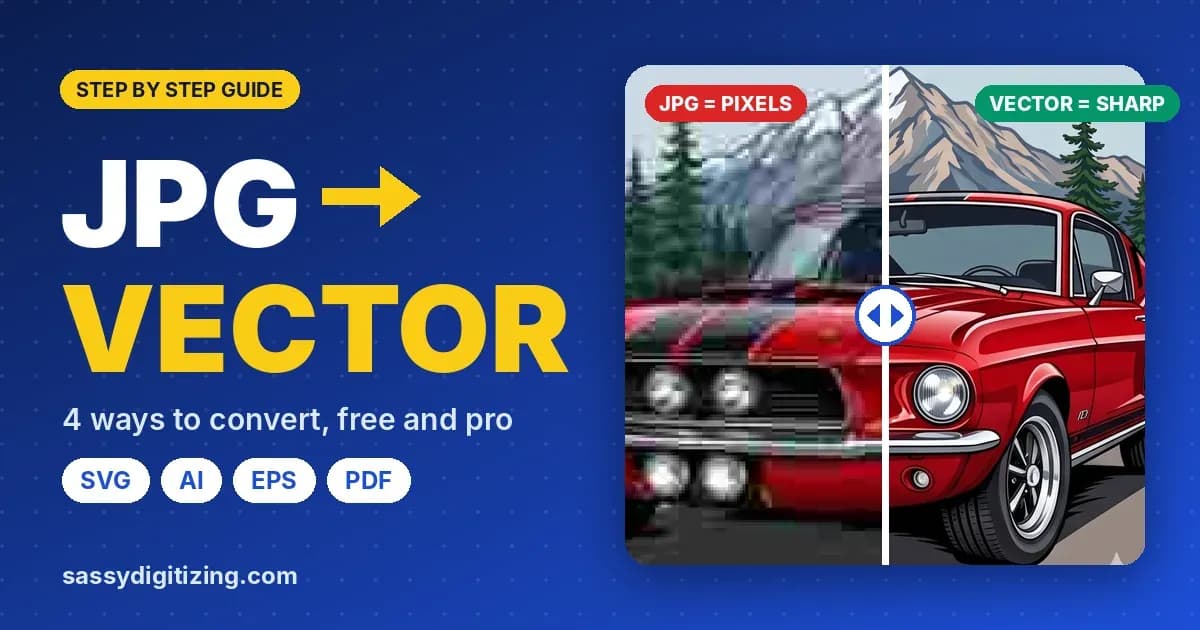
How to Convert JPG to Vector (Free and Pro Methods)
Quick answer: A JPG is a raster image, so you convert JPG to vector by tracing it into real paths and saving it as SVG, AI or EPS. For a quick result, use Image Trace in Illustrator or the free Trace Bitmap tool in Inkscape. Online JPG to SVG converters are fastest but leave rough edges. For a logo going to print, embroidery, vinyl or a laser, a hand redrawn vector is the only result that is truly clean. Renaming a .jpg to .svg does not convert it.
Only have a JPG or PNG? Get it redrawn by hand as a vector from $10.
JPG is
A raster, made of pixels
Convert it to
SVG, AI, EPS or PDF
Best for logos
Manual redraw, from $10
In this guide
- Can You Convert a JPG to a Vector?
- Why JPGs Are Harder to Vectorize Than PNGs
- 4 Ways to Convert JPG to Vector, Compared
- Method 1: Illustrator Image Trace
- Method 2: Inkscape (Free)
- Method 3: Online JPG to SVG Converters
- Method 4: Hand Redrawn Vector
- How to Prepare a JPG Before Tracing
- JPG to Vector for Laser, Vinyl, Print and Embroidery
- How to Check Your Result
- Common Mistakes When Converting JPG to Vector
- FAQs
Can You Convert a JPG to a Vector?
Yes, but not by saving it differently. A JPG is a grid of pixels with no shapes inside it. To get a vector, the pixels have to be traced into new paths and curves, either by software or by hand. The result is a new file, usually SVG, AI or EPS, that scales to any size without blurring. If you are not sure what makes a file a vector in the first place, our guide on what a vector file is explains it in plain terms.
Watch out: Changing the extension from .jpg to .svg, or placing a JPG inside an AI or PDF file, does not make it a vector. The image inside is still pixels and will still blur when enlarged.
Why JPGs Are Harder to Vectorize Than PNGs
JPG is the most common logo file people have, and also the hardest to trace cleanly. Three things get in the way:
No transparent background
Every JPG has a solid background, usually white. Tracing picks it up as a shape, so it has to be removed or ignored.
Compression blocks
JPG saves space by blurring edges into blocky, smudged pixels. Tracers read those blocks as real detail and make jagged paths.
Small website copies
Most JPG logos are saved from a website or email at a few hundred pixels wide, which is too little detail for a clean trace.
Pro tip: If you have the same logo as a PNG, a PDF or an old print file, start from that instead. Ask your designer, printer or old sign maker before tracing a small JPG.
4 Ways to Convert JPG to Vector, Compared
| Method | Cost | Speed | Result Quality | Best For |
|---|---|---|---|---|
| Online JPG to SVG converter | Free or low cost | Seconds | Rough edges, extra points | Quick mockups, simple shapes |
| Inkscape Trace Bitmap | Free | 5 to 20 minutes | Good on bold, simple logos | One or two color artwork |
| Illustrator Image Trace | Illustrator subscription | 10 to 30 minutes | Good, still needs cleanup | Flat color logos |
| Hand redrawn by a vector artist | From $10 per design | A few hours | Clean, minimal paths | Print, embroidery, vinyl, laser |
Method 1: Illustrator Image Trace
1Place the JPG
Open a new document and go to File > Place, then click on the artboard.
2Open Image Trace
Select the image and open Window > Image Trace so you can reach the Advanced settings.
3Pick a preset
Black and White Logo for one color art, or 3, 6 or 16 Colors for flat color logos.
4Fix the JPG settings
Raise Noise to about 25 px to ignore compression blocks, set Colors to the real number of colors and tick Ignore White to drop the background.
5Expand and clean up
Click Expand, Ungroup, run Object > Path > Simplify and fix corners with the Direct Selection tool.
6Save
Save as AI, or export SVG, EPS or PDF.
For exact slider values by artwork type, see our step by step guide on how to vectorize an image in Illustrator.
Method 2: Inkscape (Free)
Inkscape is a free vector editor for Windows, Mac and Linux, and its Trace Bitmap tool works well on bold, simple logos.
1Import the JPG
Go to File > Import, choose your JPG and pick Embed.
2Open Trace Bitmap
Select the image and go to Path > Trace Bitmap (Shift+Alt+B).
3Choose a mode
Single scan with Brightness cutoff for one color logos, or Multiple scans with Colors for multi-color art. Set the number of scans to your real color count.
4Clean the options
Turn on Smooth corners and Optimize, and raise Speckles to drop JPG noise. Click Update to preview, then Apply.
5Delete the original
Move the traced result aside, delete the JPG underneath and remove any background shape.
6Simplify and save
Use Path > Simplify (Ctrl+L) lightly, then File > Save As > Plain SVG.
How much will your vector cost? Use our free vector price calculator to see the price before you order.
Check my priceMethod 3: Online JPG to SVG Converters
Free online converters are the fastest way to turn a JPG into an SVG. Upload the image, pick the number of colors and download the result. They are fine for a quick mockup or a very simple icon, but on a real logo they usually produce wobbly curves, hundreds of extra points, merged letters and stray specks.
| Good For | Not Good For |
|---|---|
| Simple icons and silhouettes | Logos with small text |
| Quick mockups and previews | Files going to a cutter, laser or embroidery |
| High contrast black and white art | Blurry or compressed JPGs |
Watch out: Check what a converter does with your upload before you use it for a client's logo, and always zoom in on the result before you print or cut it.
Method 4: Hand Redrawn Vector
A vector artist redraws the logo from scratch in Illustrator, using the JPG only as a guide. Every curve is placed by hand with as few points as possible, text is rebuilt with the real font or redrawn, and colors are matched to exact values. This is the only method that gives a clean result from a small, blurry or heavily compressed JPG, and it is what our JPG to vector conversion service does for every order.
| Auto Trace | Hand Redrawn | |
|---|---|---|
| Edges | Wobbly, jagged on curves | Smooth, exact curves |
| Anchor points | Hundreds or thousands | Only what each shape needs |
| Text | Melted, uneven letters | Real font or redrawn letters |
| Colors | Extra near duplicate shades | Exact brand or Pantone colors |
| Ready for production | Usually needs cleanup | Yes |
How to Prepare a JPG Before Tracing
Five minutes of cleanup in any photo editor makes every tracing method work better:
- Use the largest version you have. More pixels means more real edge detail to follow.
- Crop tight. Remove everything except the logo itself.
- Raise the contrast. Make dark areas darker and the background pure white.
- Soften compression blocks. A very light blur or Reduce Noise filter smooths JPG artifacts so they are not traced as detail.
- Reduce the colors. Use Posterize or an indexed color mode to bring the logo down to its real color count.
JPG to Vector for Laser, Vinyl, Print and Embroidery
Laser engraving and cutting
Lasers cut along paths, so a JPG must become clean, closed vector lines with cut and engrave on separate colors. See our guide to preparing vector files for laser engraving.
Vinyl and Cricut
Cutters need welded shapes, outlined text and no overlaps. Our vinyl cutter file guide covers Cricut and Silhouette setup.
Screen printing and signs
Printers need one clean shape per ink color and exact Pantone values, which a traced JPG rarely gives without cleanup.
Embroidery
A clean vector gives the digitizer exact shapes to build stitches from, but the vector still has to be digitized into a stitch file.
How to Check Your Result
- Zoom to 800%. Edges should stay smooth. Pixel steps mean the image was not really traced.
- Look at Outline view (Ctrl+Y in Illustrator, View > Display Mode > Outline in Inkscape). Clean files have few, smooth paths.
- Click a letter. You should see editable anchor points, not one flat image.
- Check the background. There should be no white box behind the logo.
Common Mistakes When Converting JPG to Vector
| Mistake | What Happens | The Fix |
|---|---|---|
| Renaming .jpg to .svg | Still pixels, still blurs | Trace it into real paths |
| Tracing a tiny website JPG | Jagged, guessed shapes | Find a bigger source or have it redrawn |
| Default trace settings | Compression blocks become shapes | Raise Noise or Speckles, reduce colors |
| Leaving the white background | White box prints or cuts | Use Ignore White or delete the shape |
| Keeping traced text | Wobbly, uneven letters | Retype with the real font or redraw |
| Skipping cleanup | Thousands of points, failed cuts | Simplify, weld and close paths |
You may also find these useful: convert PNG to vector.
Turn your image into a clean vector file.
We redraw any JPG, PNG, PDF or photo by hand, with smooth paths and separated colors, delivered as AI, EPS, SVG and PDF.
Free PNG preview before delivery · Free small revisions until you're satisfied · 50% off your first order
Get my logo vectorizedFrequently Asked Questions
How do I convert a JPG to a vector?
Trace it into vector paths with Illustrator Image Trace, Inkscape Trace Bitmap or an online converter, clean up the result and save it as SVG, AI or EPS. For logos going to production, a hand redrawn vector gives the cleanest result.
Can I convert a JPG to vector for free?
Yes. Inkscape is free and its Trace Bitmap tool works well on simple, bold logos. Free online converters also work for simple shapes but usually leave rough edges and extra points.
Is a JPG a vector file?
No. A JPG is a raster image made of pixels. It blurs when enlarged and has to be traced to become a vector.
What is the best format to convert a JPG to?
SVG for web, Cricut, vinyl and laser software, AI for an editable master file and EPS or PDF for printers and sign makers.
How do I convert a JPEG to SVG?
JPEG and JPG are the same format. Trace it in Illustrator or Inkscape, then save or export as SVG. Saving as SVG without tracing only wraps the pixels in an SVG file.
How do I convert a JPG to vector in Illustrator?
Place the JPG, open Window > Image Trace, choose a preset, raise Noise to about 25 px, set Colors to the real color count, tick Ignore White and click Expand. Then simplify and clean up the paths.
Why does my traced JPG look jagged?
The JPG was too small or heavily compressed, so the tracer followed the blocky pixels. Start from a larger source, soften the compression first or have the logo redrawn by hand.
Can I convert a JPG to vector for a laser engraver?
Yes. Trace it, close every path, convert text to outlines, put cut and engrave lines on separate colors and export as SVG or DXF at the final size.
Can a blurry or low resolution JPG be vectorized?
Yes, by hand. A vector artist redraws the shapes using the blurry image as a guide, which works even when auto trace fails.
How much does it cost to convert a JPG to vector?
At Sassy Digitizing, hand redrawn JPG to vector conversion starts at $10 per design, with AI, EPS, SVG and PDF files included. First time customers get 50% off.
Rory Fletcher

Senior Graphic Illustrator and Vector Artist
With a decade of experience in digital illustration, Rory is the go-to expert at Sassy Digitizing for complex artwork transitions. He specializes in the intricate process of converting raster images into clean and production-ready vectors. Rory's deep understanding of file architecture, specifically the nuances between PNGs and scalable curves, ensures that every design maintains perfect clarity regardless of size or application.
Expertise:
Related Articles

Top 10 Vector Art Companies in the World: Global Rankings
The demand for high-quality graphic assets has never been higher. Whether you are a large-scale printing house or a smal…
Color Separation for Screen Printing Guide
How color separation for screen printing works: spot color vs simulated process vs CMYK, step by step in Illustrator and…
What File Format Do Vinyl Cutters Use? Setup Guide
What file format vinyl cutters use, how to make an SVG for Cricut and Silhouette, plus welding, outline strokes, minimum…