





🧵 1 to 2 hours rush Digitizing Available | No Extra Charge | Serving USA, Canada & UK | Call: +1 716 309 2066 • Call: +1 815 664 3282
Sassy Digitizing LLC – Professional Embroidery Digitizing Service
Sassy Digitizing LLC
  • Home
  • Embroidery Digitizing
    View all →
    • Cap Digitizing
    • 3D Puff Digitizing
    • Left Chest Digitizing
    • Jacket Back Digitizing
    • Small Letter Digitizing
    • Applique Digitizing
    • PNG to PES
    • Convert Logo to Embroidery
    Vector Art
    View all →
    • DTF / DTG Vector Art
    • Image Vectorization Service
    • Laser Engraving Vector Files
    • Logo / Flyer / Poster Vector Design
    • Screen Printing / Sublimation Vector Art
    • Vinyl Cutting Vector Files
  • Portfolio
  • Pricing
  • FreeBie
  • Free Design Test
  • About UsQuality GuaranteeManual vs AI DigitizingBlog
  • Contact
Client Login
Home/Embroidery/Fixing Embroidery Registration Gaps: “It Looks Oval Instead of Round”

Fixing Embroidery Registration Gaps: “It Looks Oval Instead of Round”

Expert insights, industry trends, and deep dives into the worlds of professional digitizing and embroidery production and vector art.

Contact Us
★Trustpilot
Sassy Digitizing rated 4.7 out of 5 stars on Trustpilot by verified embroidery clients

4.7/5

Guaranteed File Compatibility & Industry Standards

Tajima
Adobe Illustrator
Brother
CorelDRAW
Melco
Wilcom
Back to Blog
Embroidery
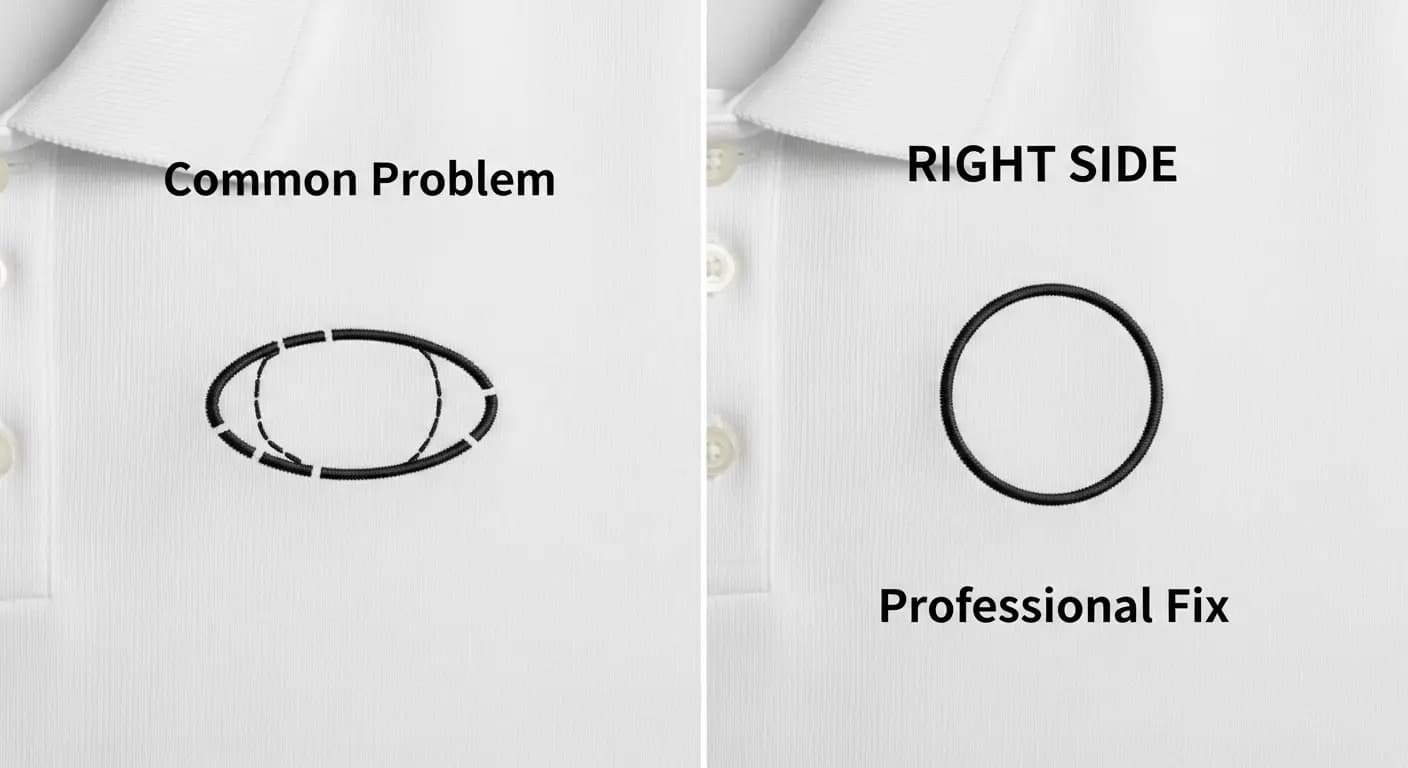
comparison of oval distorted embroidery circle versus perfectly round professional embroidery

Fixing Embroidery Registration Gaps: “It Looks Oval Instead of Round”

February 11, 2026
5 min read
Sassy Digitizing

Fix Oval Circles in Embroidery: The Digitizing Solution

You’ve run the same circle design three times, and every single one comes out looking like an egg instead of a coin. There’s a noticeable gap where the circle should close, and the sides stretch outward instead of staying perfectly round.

This is one of the most frustrating issues in embroidery digitizing, and it happens more often than you’d think—especially with small logos, badges, and monograms. The good news? It’s not your machine. It’s the digitizing.

Let’s break down why this happens and how to fix it permanently.

Why Circles Turn Oval
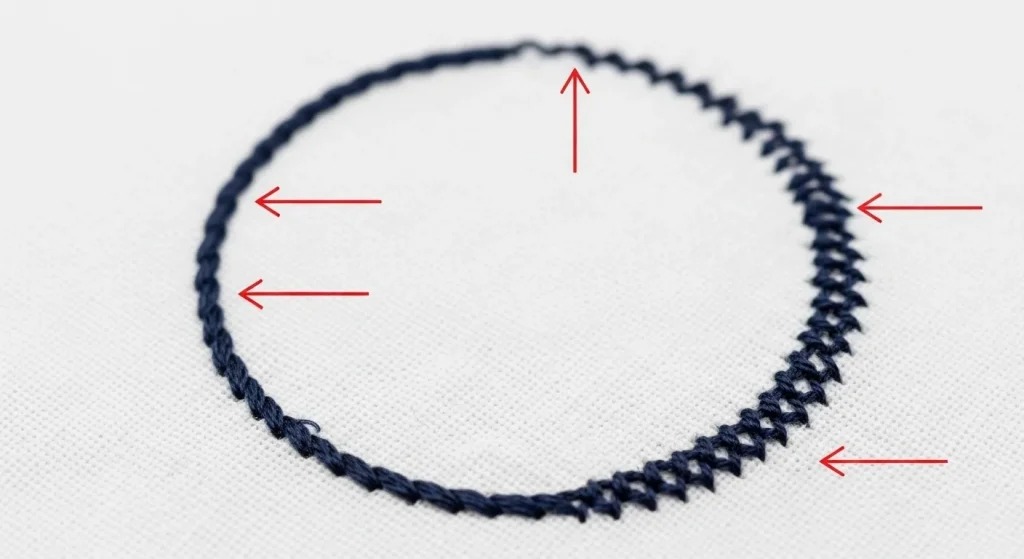
Close-up showing gaps and oval distortion in circle embroidery with marked problem areas
Three main issues: gap at start/end point, oval distortion, and uneven tension

A perfect circle in your design software does not automatically translate into a perfect circle when stitched. Embroidery machines pull fabric as the needle moves, and this pulling force distorts the shape—especially on curved objects.

Three main reasons circles fail:

  • No pull compensation: The design doesn’t account for fabric tension during stitching.
  • Wrong stitch direction: Linear stitches across a curve create gaps and distortion.
  • Missing or weak underlay: Without a stable base, the fabric shifts under the needle.

If your digitizer didn’t adjust for these factors, the circle will always look oval, no matter how many times you re-run it.

The Digitizing Problem
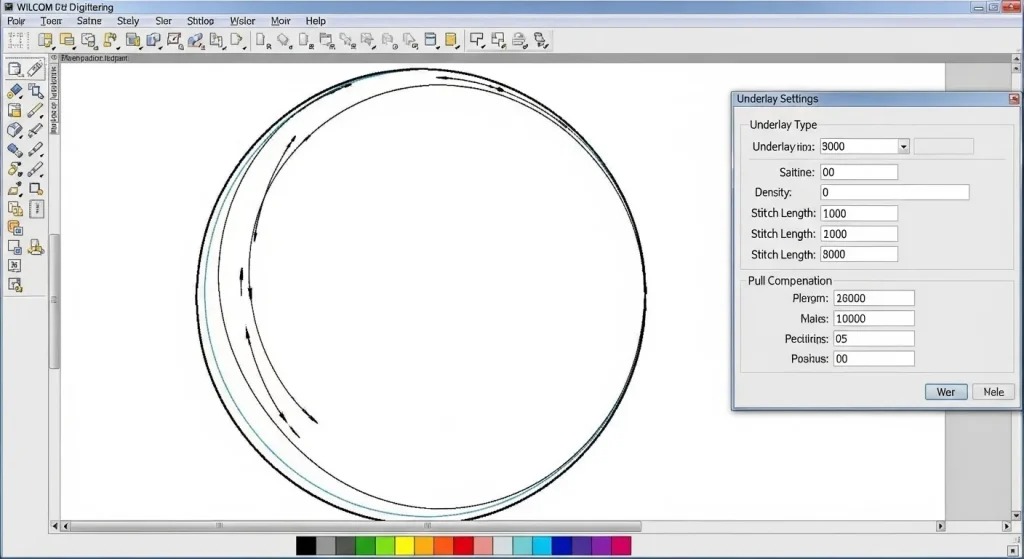
Wilcom digitizing software showing proper circle embroidery settings and pull compensation
Wilcom software interface displaying correct stitch direction and underlay settings for circles

Many beginner digitizers use auto-digitizing software that converts artwork into stitches without understanding the mechanics. These programs treat a circle like a square—they just fill it with straight lines.

Here’s what happens:

The software lays stitches horizontally or vertically across the circle. As the needle moves back and forth, it pulls the fabric inward along the stitch direction. The sides compress, the top and bottom stretch, and you’re left with an oval.

A professional digitizer using Wilcom software manually adjusts stitch angles, density, and underlay to maintain the shape under tension.

Note: If you’re struggling with consistent distortion across multiple designs, your files likely need professional rework. Auto-converted files rarely account for real-world stitching behavior.

How to Fix Oval Circles: Step-by-Step

Step 1: Check the Start and End Points

The gap you’re seeing is usually caused by misaligned start and end points. In a well-digitized circle, the last stitch should overlap the first stitch by at least 2mm to create a seamless connection.

Quick Fix: Open the file in your digitizing software and manually move the start point so that the end overlaps it. Lock both points together.

Step 2: Add Proper Underlay
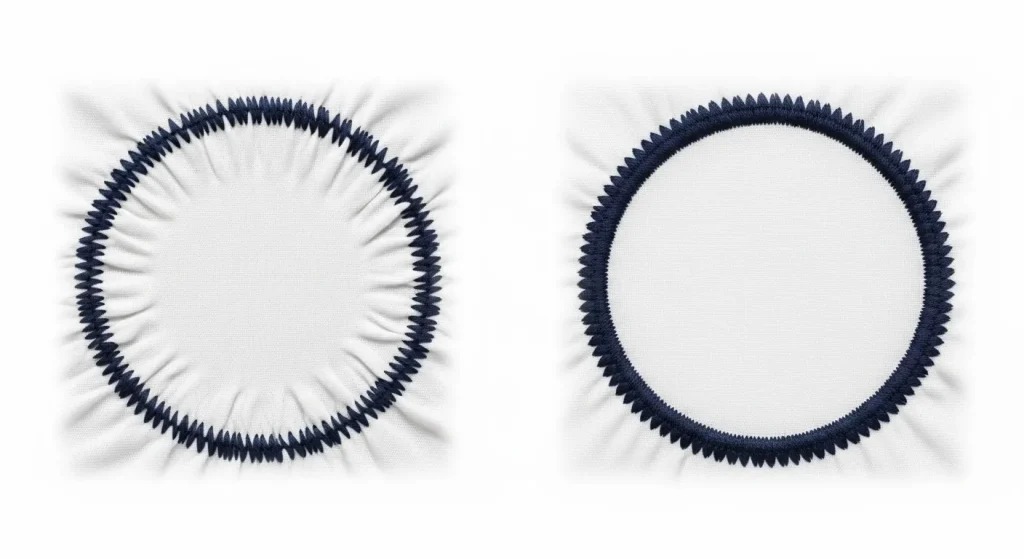
Comparison showing circle embroidery without and with proper center-out radial underlay stitching
Without underlay (left) fabric puckers; with proper underlay (right) circle stays smooth and round

Underlay is the foundation of any stable embroidery. For circles, a center-out radial underlay works best. This means the underlay stitches radiate outward from the center of the circle, creating a firm base that resists distortion.

Without underlay, the fabric bunches and shifts as the top stitches pull—leading directly to that oval shape.

Step 3: Adjust Stitch Direction
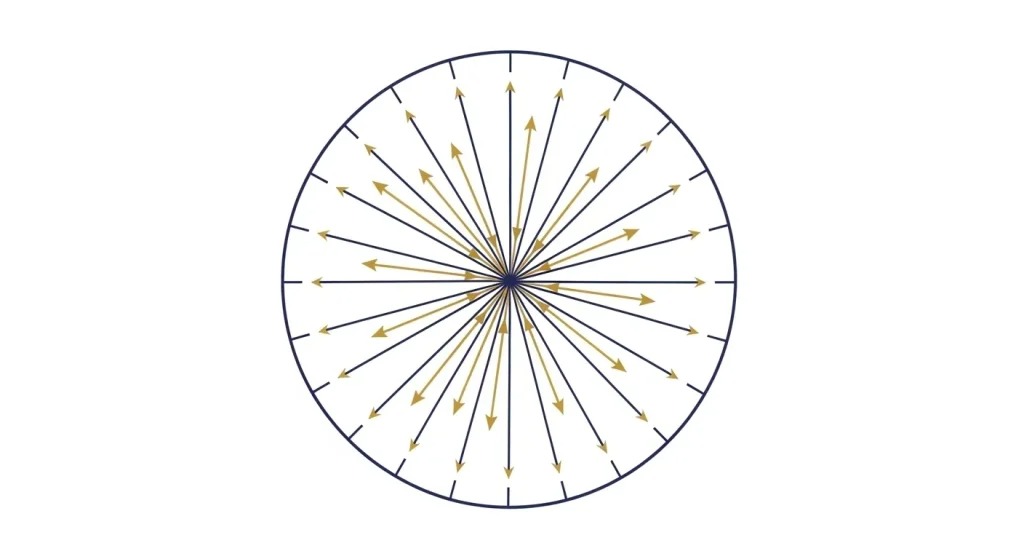
Diagram showing proper radial stitch direction flowing from center outward in perfect circle
Arrows show how stitches should radiate from center to maintain perfect roundness

Circles need radial stitch direction, not linear. This means every stitch should flow from the center outward, following the natural curve of the circle.

Why this matters: Radial stitching distributes tension evenly around the shape. Linear stitching concentrates all the pull in one direction, warping the circle into an oval.

This is a manual adjustment. Auto-digitizing tools rarely get this right.

Step 4: Apply Pull Compensation
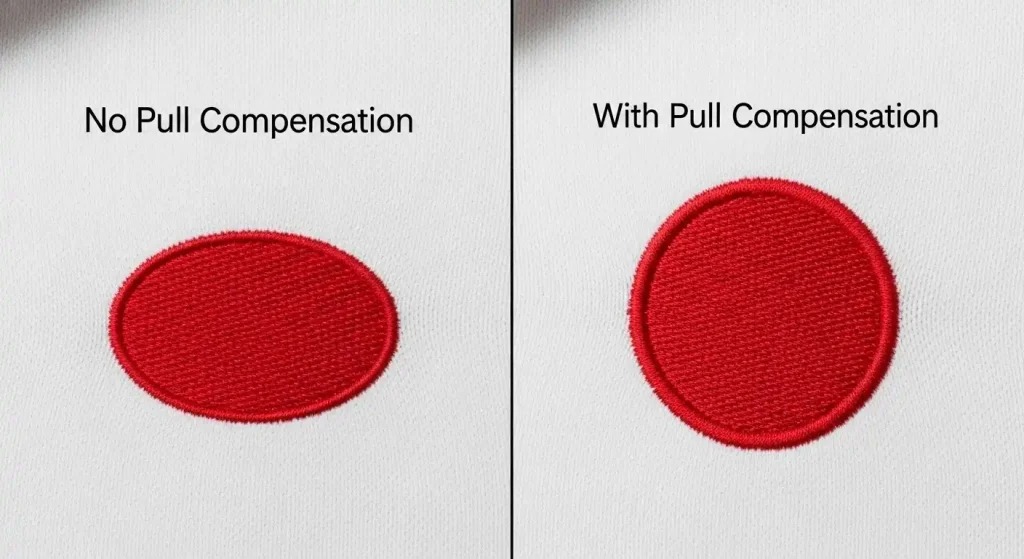
Before and after showing effect of pull compensation on fixing oval embroidery circles
No compensation creates oval shape (left); proper compensation keeps circle perfectly round (right)

Pull compensation is a digitizing technique that slightly enlarges the design in the direction of the pull. Since embroidery compresses fabric along the stitch line, adding 5–10% width compensation keeps the circle round after stitching.

Pro Tip: Heavy fabrics like denim require more compensation than lightweight knits. The digitizer needs to know your fabric type to set this correctly.

Step 5: Test on Your Fabric

Even the best digitizing won’t work if it’s not tested. Run a sample stitch-out on the actual fabric you’ll be using. Adjust density, underlay, and compensation based on the results.

A circle that looks perfect on cotton might still distort on stretchy polyester or thick fleece.

Summary
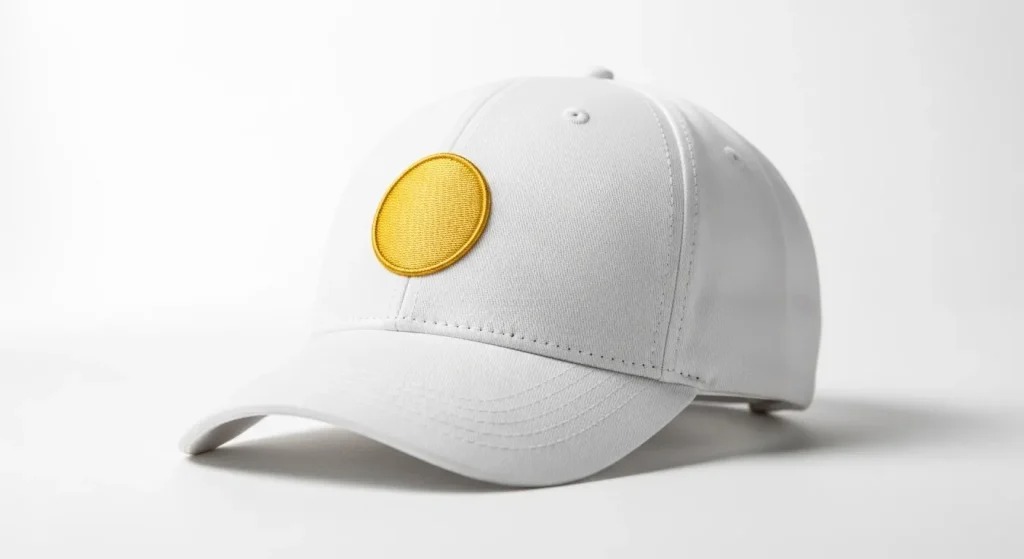
Professional embroidered circle with perfect roundness and no gaps on white baseball cap
Final result: flawless round embroidery with seamless edges and no distortion

Oval circles and gaps are digitizing problems, not machine problems. The fix requires proper underlay, radial stitch direction, pull compensation, and precise start/end point alignment.

If your designs keep coming out distorted, it’s time to have them professionally digitized. Whether you need custom patches, cap logos, or jacket designs, Sassy Digitizing ensures every shape holds its form under the needle.

About the Author

Keith Blair | Senior Quality Control (HOD)

Keith Blair serves as the Head of Department for Quality Control at Sassy Digitizing, bringing 12 years of commercial embroidery experience to the team. His role focuses on the technical mechanics of digitizing, specifically adjusting stitch densities and lengths to suit different fabric types.

A specialist in advanced production methods, Keith oversees the digitizing standards for complex 3D puff, appliqué, and small lettering projects. He ensures that every file is tested for efficiency and runnability before it reaches the customer, bridging the gap between digital design and physical production.

K

Keith Blair

Senior Quality Control (HOD)

As the Head of Quality Control at Sassy Digitizing, Keith brings over 12 years of hands-on commercial embroidery experience to the table. He is our resident problem-solver, specializing in the technical nuances of stitch density, pull compensation, and complex digitizing. When he's not establishing quality standards for 3D puff and appliqué, you'll find him perfecting the art of small lettering to ensure every stitch counts.

Expertise:

3D puffappliquésmall letteringstitch densitypull compensation

Related Articles

Converting PNG image to PES embroidery
Embroidery
December 9, 20254 min read

How to Convert PNG to PES for Embroidery: The Complete Guide (2026 Update)

When converting a PNG image to a PES file, you are essentially translating a flat picture into a language your machine u…
Read More
How to Convert PNG to PES
Embroidery
March 19, 20264 min read

How to Convert PNG to PES for Embroidery The Complete Guide 2026

When you convert a PNG image to a PES file, you are translating a flat picture into a language. Your embroidery machine …

Read More
Professional embroidery machine stitching a custom PES design on fabric.
Embroidery
February 23, 20266 min read

How to Convert Designs to PES Format for Perfect Stitching

The Bridge Between Art and Stitching Embroidery is an art form that has evolved from hand-stitching to high-tech machine…

Read More
FAST. RELIABLE. PROFESSIONAL.

Your Design,
Our Expertise.
Delivered in 2–4 Hours!

Upload your artwork and get a machine-ready embroidery file in just 2 to 4 hours. No upfront payment. Pay only after you approve. Free revisions included!

2–4 Hours

Rush Turnaround

100% Approval

Pay After Approval

Free Revisions

Until You're Happy

Why Choose Us?

Lightning-Fast Delivery

Get your file in 2–4 hours, every time.

Expert Quality

38+ expert digitizers with years of experience.

24/7 Support

We're here to help, anytime you need us.

Secure & Confidential

Your files are safe with us. Always.

Ready to Get Started?

Upload your artwork now and let our experts turn it into perfection, fast.

1,794+

Happy Clients

4.7★

Client Rating

38+

Expert Digitizers

6+

Years Experience

Upload Your Artwork
Sassy Digitizing LLC – Embroidery Digitizing and Vector Art Services

Sassy Digitizing LLC

Manual Embroidery Digitizing & Vector Art Services

Serving USA · Canada · UK

Expert manual embroidery digitizing completely eliminates sloppy automated shortcuts. Customers secure exceptionally fast turnarounds with highly transparent pricing and premium files compatible across every major commercial embroidery machine brand.

Services

  • Cap Digitizing
  • 3D Puff Digitizing
  • Left Chest Digitizing
  • Jacket Back Digitizing
  • Small Letter Digitizing
  • Applique Digitizing
  • PNG to PES
  • Convert Logo to Embroidery
  • DTF / DTG Vector Art
  • Image Vectorization Service
  • Laser Engraving Vector Files
  • Logo / Flyer / Poster Vector Design
  • Screen Printing / Sublimation Vector Art
  • Vinyl Cutting Vector Files

Tools

  • Stitch Calculator
  • Embroidery Price Calculator
  • Vector Price Calculator
  • Embroidery Size Chart
  • File Format Guide

Knowledge

  • What is DST File
  • What is PES File
  • Embroidery File Formats
  • Embroidery Density Guide
  • Stitch Count Guide
  • Thread Break Problems
  • Machine Errors
  • PNG vs Vector
  • Vector vs Raster

Contact

  • +1 716 309 2066
  • +1 815 664 3282
  • info@sassydigitizing.com
  • 30 N Gould St Ste N, Sheridan, WY 82801, USA

Payment Accept

Accepted payment gateway methods

© 2026 Sassy Digitizing LLC. All Rights Reserved.

Privacy PolicyTerms & ConditionsRefund PolicyDelivery Policy