🧵 1 to 2 hours rush Digitizing Available | No Extra Charge | Serving USA, Canada & UK | Call: +1 716 309 2066 • Call: +1 815 664 3282
Sassy Digitizing LLC – Professional Embroidery Digitizing Service
  • Home
  • Embroidery Digitizing
    View all →
    • Cap Digitizing
    • 3D Puff Digitizing
    • Left Chest Digitizing
    • Jacket Back Digitizing
    • Small Letter Digitizing
    • Applique Digitizing
    • PNG to PES
    • Convert Logo to Embroidery
    Vector Art
    View all →
    • DTF / DTG Vector Art
    • Image Vectorization Service
    • Laser Engraving Vector Files
    • Logo / Flyer / Poster Vector Design
    • Screen Printing / Sublimation Vector Art
    • Vinyl Cutting Vector Files
  • Portfolio
  • Pricing
  • FreeBie
  • Free Design Test
  • About UsQuality GuaranteeManual vs AI DigitizingBlog
  • Contact
Client Login
Home/Knowledge Base/Thread Break Problems

Fix Embroidery Thread Breaks: Troubleshooting Guide

Embroidery thread breaks are a common, costly issue, usually caused by one of four factors: the digitizing file, machine tension, the needle, or the fabric and stabilizer setup. This guide explains each cause and fix, and provides corrected digitizing files in 2–4 hours.

Fix My Embroidery File
★Trustpilot
Sassy Digitizing rated 4.7 out of 5 stars on Trustpilot by verified embroidery clients

4.7/5

Guaranteed File Compatibility & Industry Standards

Tajima
Brother
Happy Japan
Ricoma
ZSK
Barudan

Why Is My Embroidery Thread Breaking?

Thread breaks are the most common complaint in production embroidery. They cost time, waste thread and damage garments if not caught quickly.

    Upload Problem Design

    Density Too High

    Too many stitches per square inch causes the needle to pierce through fabric already full of thread. The thread has no room to lock correctly and breaks at maximum tension. Most common in auto-digitized files.

    Pull Compensation Wrong

    Incorrect pull compensation causes stitches to stretch tighter than intended as the fabric moves under the needle. The increased tension breaks the thread. Common in cap digitizing files that do not account for curved-surface pull.

    Needle or Tension Issue

    Thread breaks caused by machine tension are consistent across all designs. Thread breaks caused by the digitizing file occur at specific points in the design, usually in the same place on every run.

    Long Jump Stitches

    Jump stitches that are too long create a slack thread loop that catches the next stitch and breaks. Correctly digitized files minimise jump stitches and plan trimming positions. Auto-digitized files often have long, unplanned jumps between design elements.

    📁
    File Issues
    Density, underlay, paths
    🪡
    Thread Issues
    Quality, age, brand
    🔩
    Needle Issues
    Blunt, wrong size, bent
    ⚙️
    Machine Issues
    Tension, timing, hooks
    🎯
    Most Common
    File density too high
    ✅
    Prevention
    Manual digitizing with correct settings

    How to Diagnose Which Cause Is Responsible

    The pattern of your thread breaks tells you the cause. If the thread breaks at the same point in every run of the same design, the cause is in the file. If the thread breaks at random points throughout the design, the cause is the machine setup, needle condition, or thread quality. If the thread breaks only when sewing a specific fabric, the density settings are wrong for that fabric type.

    Thread Breaks Caused by the Digitized File

    A file with density that is too high is the most common cause of persistent thread breaks. When stitches are packed too tightly, the needle is forced to penetrate fabric that is already saturated with thread from previous passes. The thread shreds under the friction at the needle eye. The solution is to redigitize the file with lower density in the affected area. Increasing machine tension to compensate will not fix this and may damage the machine.

    File Caused Thread Breaks vs Machine Caused Thread Breaks Which File Does What

    📁

    File Caused Thread Breaks

    Caused by the digitized file

    • Breaks occur at the same point in the design on every run
    • Breaks on the same element regardless of thread brand or needle
    • Other parts of the design run cleanly
    • Breaks on dense fill areas or heavy satin sections
    • New needle and fresh thread do not fix the problem
    • Caused by density too high, incorrect underlay, or poor stitch pathing
    ✓ Fix: Redigitize with correct settings
    VS
    ⚙️

    Machine Caused Thread Breaks

    Needle, tension, and hook issues

    • Breaks occur at random points across multiple designs
    • Breaks with different files and different fabrics
    • Replacing the needle resolves most machine-side breaks
    • Thread fraying at the needle eye indicates needle or tension issue
    • Thread breaking at the bobbin area indicates hook timing issue
    • Thread breaking at the cone indicates thread guide damage
    ✓ Fix: Needle change plus tension check
    Get Expert Digitizing
    🔍

    Step by Step Thread Break Diagnosis

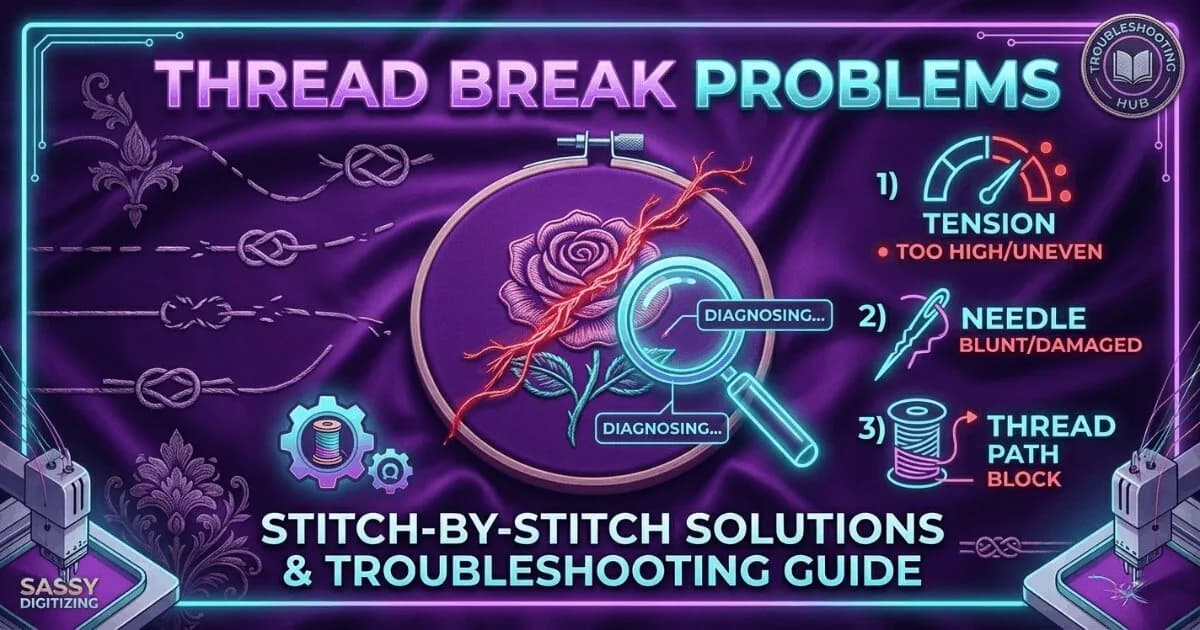
    Start by identifying the break location. Thread breaking at the needle eye indicates upper tension or needle issue. Thread breaking between the cone and needle suggests a thread guide is sharp or damaged. Thread breaking at the bobbin area suggests hook timing or bobbin tension. Thread breaking repeatedly at the same design location is the file.

    💡 The fastest test: load a different design that you know runs correctly on the same machine and same fabric. If the known-good design also breaks, the problem is the machine or needle. If only the problem design breaks, the problem is the file.

    ✓ Do this:

    • Replace the needle first as this fixes the majority of random thread breaks
    • Use the known-good file test to separate file problems from machine problems
    • Check all thread guides for burrs or sharp edges
    • Reduce upper tension by half a turn if thread is breaking at the needle eye

    ✗ Avoid this:

    • ✗Do not increase upper tension to try to fix a density problem in the file
    • ✗Do not continue production on a design that keeps breaking at the same point
    • ✗Do not use damaged or old thread on production runs
    • ✗Do not ignore consistent breaks at the same design location
    🔩

    Needle Replacement and Its Impact on Thread Breaks

    Needles become blunt quickly in commercial production. A needle that has been used for more than 8 to 10 hours of continuous sewing should be replaced. A blunt needle creates friction at the entry point that cuts the thread. An incorrect needle size for the thread weight also causes breaks. Size 75 or 80 needles work for standard 40-weight embroidery thread.

    💡 In commercial production, set a schedule to replace all needles at the start of each production day regardless of visible wear. The cost of needles is tiny compared to the cost of a production run ruined by thread breaks.

    ✓ Do this:

    • Replace needles every 8 to 10 sewing hours or at the start of each day
    • Use size 75 or 80 needles for standard 40-weight embroidery thread
    • Use size 90 for heavier thread weights
    • Inspect the needle for bending before loading a new design

    ✗ Avoid this:

    • ✗Do not continue production with a visibly blunt or bent needle
    • ✗Do not use the wrong needle size for your thread weight
    • ✗Do not reuse needles after a needle break event without inspection
    📁
    Extension
    .dst
    🏭
    Machine
    Tajima, Barudan
    🎨
    Colour Data
    Not included
    💾
    File Size
    Smallest format
    ✅
    Sassy Includes
    Every order
    📐
    Commands
    XY stitch, jump, trim
    File format comparison
    Break LocationMost Likely CauseFix
    At needle eyeUpper tension too tight or blunt needleReplace needle and reduce upper tension half a turn
    Between cone and needleDamaged thread guideRun finger along all guides to find burr, replace guide
    At bobbin areaHook timing off or bobbin seated incorrectlyCheck bobbin seating, check hook timing
    Same design location every runFile density too high in that areaRequest redigitized file with lower density
    Multiple locations throughout designBlunt needleReplace needle and test again
    Only on specific fabricDensity wrong for that fabric weightRequest fabric-specific density adjustment

    If your thread breaks are caused by the file, request a redigitized version from Sassy Digitizing with fabric-specific density settings.

    Start Production-Ready Order
    K

    Keith Blair

    Senior Quality Control (HOD)

    As the Head of Quality Control at Sassy Digitizing, Keith brings over 12 years of hands-on commercial embroidery experience to the table. He is our resident problem-solver, specializing in the technical nuances of stitch density, pull compensation, and complex digitizing. When he’s not establishing quality standards for 3D puff and appliqué, you’ll find him perfecting the art of small lettering to ensure every stitch counts.

    Expertise:

    3D puffappliquésmall letteringstitch densitypull compensation

    ARTICLES

    Go behind the scenes of our design process. Discover technical tips for embroidery digitizing and best practices for high-quality vector conversions.

    What Is a DST File? The Commercial Embroidery Format Explained

    What Is a DST File? The Commercial Embroidery Format Explained

    A DST file is the Tajima stitch format used by commercial embroidery machines worldwide. Learn what it contains, which m…

    Read More
    What Is a PES File? Brother and Baby Lock Embroidery Format Explained

    What Is a PES File? Brother and Baby Lock Embroidery Format Explained

    A PES file is the native embroidery format for Brother and Baby Lock machines. It stores thread colour information insid…

    Read More
    Embroidery File Formats Explained: DST, PES, EMB, JEF, VP3 and More

    Embroidery File Formats Explained: DST, PES, EMB, JEF, VP3 and More

    Complete guide to every major embroidery file format. Learn which format your machine needs, what each file contains, an…

    Read More
    Embroidery Density Guide: What It Is and Why It Controls Production Quality

    Embroidery Density Guide: What It Is and Why It Controls Production Quality

    Embroidery density controls how many stitches are placed per unit area. Too high causes puckering and thread breaks. Too…

    Read More
    Embroidery Stitch Count Guide: What It Means and How It Affects Your Price

    Embroidery Stitch Count Guide: What It Means and How It Affects Your Price

    Stitch count is the total number of individual needle penetrations in an embroidery design. It determines pricing, produ…

    Read More
    Why Does Embroidery Thread Keep Breaking? Every Cause and Fix

    Why Does Embroidery Thread Keep Breaking? Every Cause and Fix

    Thread breaks are the most common production problem in embroidery. Learn every cause, how to diagnose which one is affe…

    Read More
    Embroidery Machine Errors: What They Mean and How to Fix Them

    Embroidery Machine Errors: What They Mean and How to Fix Them

    A guide to the most common embroidery machine error codes and problems. Learn what each error means, what causes it, and…

    Read More
    PNG vs Vector: Which File Format Do You Actually Need?

    PNG vs Vector: Which File Format Do You Actually Need?

    PNG and vector files look similar on screen but are fundamentally different. PNG is for web and digital use. Vector is r…

    Read More
    Vector vs Raster: The Complete Guide for Embroidery and Print Shops

    Vector vs Raster: The Complete Guide for Embroidery and Print Shops

    Vector and raster are the two fundamental image types in digital design. Understanding the difference determines whether…

    Read More
    How to Choose an Embroidery Digitizing Service: 7 Questions to Ask

    How to Choose an Embroidery Digitizing Service: 7 Questions to Ask

    7 questions to ask before choosing an embroidery digitizing service. Covers manual vs auto-digitizing, pricing, turnarou…

    Read More

    Tired of Constant Thread Breaks During Production?

    We manually digitize embroidery files to improve machine performance and reduce costly downtime.

    2–4 hour delivery Free revisions Pay after approval
    Create Free Account

    Related Resources

    6 resources
    Knowledge Base
    Embroidery Density GuideCorrect density settings for every fabric type.
    Guide
    Stitch Count GuideHow stitch count affects production time and pricing.
    Knowledge Base
    Machine Error CodesDiagnose and fix common embroidery machine errors.
    Service
    Cap Digitizing ServiceProfessional cap digitizing from $15, 2-4 hour delivery.
    Service
    Free Design TestTest our quality before you commit to an order.
    Knowledge Base
    How to Choose a Digitizing Service7 questions to ask before choosing an embroidery digitizing service.

    Frequently Asked Questions

    Everything you need to know about our embroidery digitizing service, pricing, file formats, turnaround times and revision policy.

    Does thread weight matter?

    Yes, thread weight significantly affects embroidery performance and must match the digitizing settings. Standard commercial embroidery thread is 40-weight polyester or rayon. Using heavier thread (30-weight) than the file was digitized for increases needle penetration resistance and tension, causing thread breaks. Using lighter thread (60-weight) can cause poor coverage and loose stitching. Thread weight, needle size, and digitizing density must all be coordinated for successful production embroidery.

    How do loop thread breaks happen?

    Loop thread breaks occur when the upper thread fails to lock properly with the bobbin thread and forms loops underneath the fabric instead of clean stitches. This is almost always caused by machine setup issues such as incorrect upper thread tension, improper threading path, damaged or incorrectly installed needle, or bobbin tension problems. Loop breaks are a machine issue, not a digitizing issue, and require proper re-threading and mechanical inspection.

    Our fix: reorder file?

    If thread breaks are caused by problems in your digitizing file such as over-density, missing underlay, or incorrect stitch direction, the correct solution is to request a file revision. If you ordered from Sassy Digitizing, submit a revision request describing exactly where thread breaks occur and we will fix the file at no cost. If the file came from another service, you can upload it and we will re-digitize it correctly from your original artwork.

    What if the error code is not recognised?

    If your embroidery machine displays an unrecognized or unusual error code, consult the machine manual or contact the manufacturer's technical support. Error codes may indicate firmware issues, sensor failures, or mechanical problems. If thread breaks happen repeatedly at the same design point, it usually indicates a digitizing issue, while random errors across designs indicate machine or maintenance issues.

    Why do thread breaks happen on small letters?

    Thread breaks on small lettering are typically caused by incorrect satin column width in the digitizing file. Auto-digitizing often produces oversized stitch columns for small text, causing repeated needle penetration into existing stitches instead of fabric. This creates excessive friction and tension leading to thread breaks. Manual digitizing sets correct column widths and adjusts density specifically for small text to prevent this issue.

    FAST. RELIABLE. PROFESSIONAL.

    Your Design, Our Expertise.
    Delivered in 2–4 Hours!

    Upload your artwork and get a machine-ready embroidery file in just 2 to 4 hours. No upfront payment. Pay only after you approve. Free revisions included!

    2–4 Hours

    Rush Turnaround

    100% Approval

    Pay After Approval

    Free Revisions

    Until You're Happy

    Why Choose Us?

    Lightning-Fast Delivery

    Get your file in 2–4 hours, every time.

    Expert Quality

    38+ expert digitizers with years of experience.

    24/7 Support

    We're here to help, anytime you need us.

    Secure & Confidential

    Your files are safe with us. Always.

    Ready to Get Started?

    Upload your artwork now and let our experts deliver perfection, fast.

    1,794+

    Happy Clients

    4.7★

    Client Rating

    38+

    Expert Digitizers

    6+

    Years Experience
    Upload Your Artwork
    Sassy Digitizing LLC – Embroidery Digitizing and Vector Art Services

    Sassy Digitizing LLC

    Manual Embroidery Digitizing & Vector Art Services

    Serving USA · Canada · UK

    Services

    • Cap Digitizing
    • 3D Puff Digitizing
    • Left Chest Digitizing
    • Jacket Back Digitizing
    • Small Letter Digitizing
    • Applique Digitizing
    • PNG to PES
    • Convert Logo to Embroidery
    • DTF / DTG Vector Art
    • Image Vectorization Service
    • Laser Engraving Vector Files
    • Logo / Flyer / Poster Vector Design
    • Screen Printing / Sublimation Vector Art
    • Vinyl Cutting Vector Files

    Tools

    • Stitch Calculator
    • Embroidery Price Calculator
    • Vector Price Calculator
    • Embroidery Size Chart
    • File Format Guide

    Contact

    • +1 716 309 2066
    • +1 815 664 3282
    • info@sassydigitizing.com
    • 30 N Gould St Ste N, Sheridan, WY 82801, USA

    Payment Accept

    Accepted payment gateway methods

    © 2026 Sassy Digitizing LLC. All Rights Reserved.

    Privacy PolicyTerms & ConditionsRefund PolicyDelivery Policy